Why I built oxyDoku
Outside of code, I play rapid chess (1750 on Chess.com) and spend a lot of time on Sudoku. In both games, the fun part isn’t just seeing the right move—it’s understanding why a position works and learning to spot the pattern yourself next time.
Once I moved into harder Sudoku puzzles—where progress depends on Wings, Fish, Almost Locked Sets, and Alternating Inference Chains—most tools stopped helping me learn. Clicking “Hint” usually just revealed a single step from a fixed solver order, with no way to see what else was sitting on the board or test whether I actually understood the logic. Worse, whenever I wanted to analyze a tough position from a site like Sudoku Exchange, pasting an 81-character puzzle string wiped out all my corner and center pencil marks.
I started extending the open-source AImenes/sudokUI project (built for sudokui.org) to fix those exact annoyances for my own practice. Over time, that personal tool grew into oxyDoku: a full-board 76-technique scanner, an outcome cross-indexer that lines up competing proofs side by side, an interactive proof verifier and chain trainer, and a Chrome extension that syncs live boards without losing pencil marks.
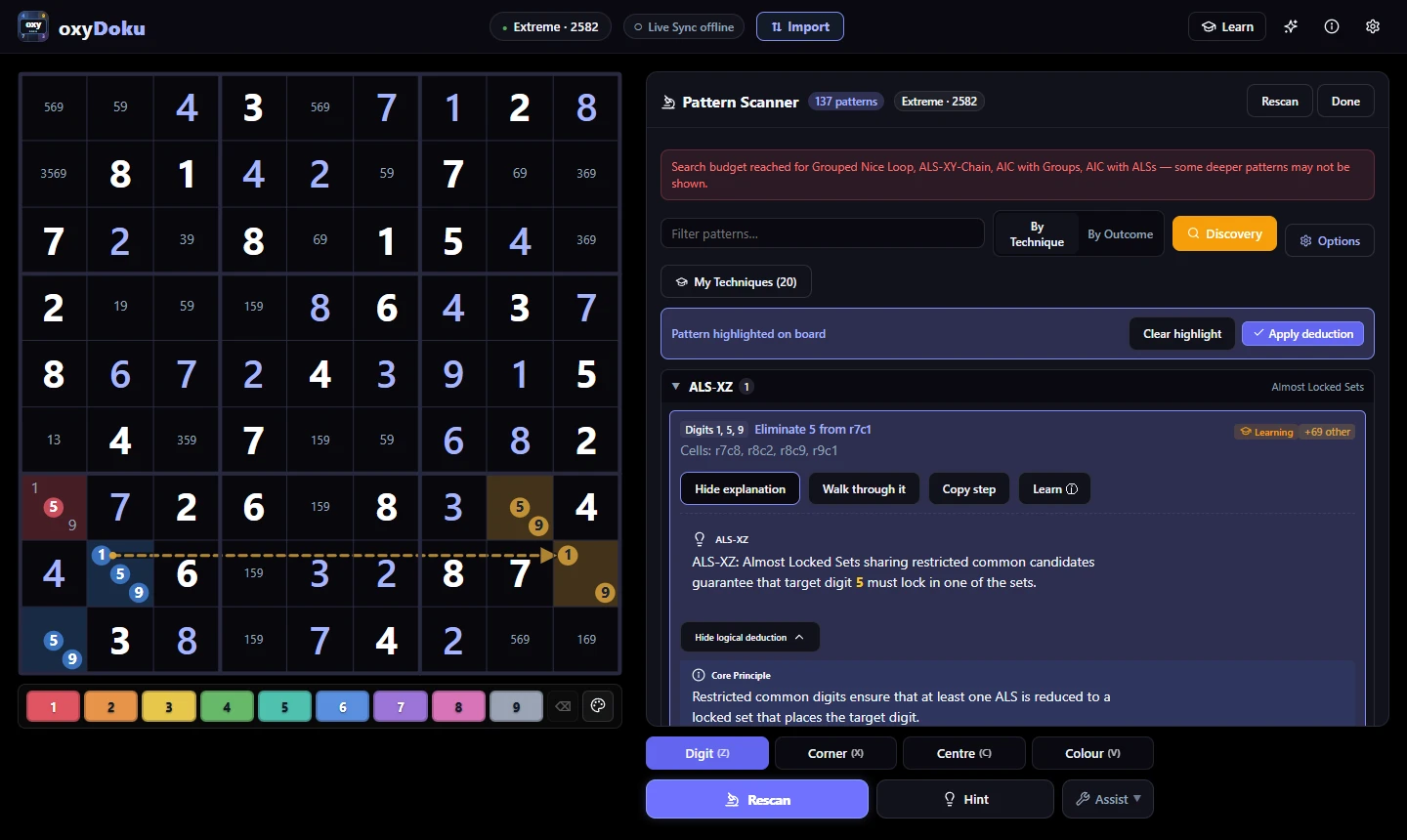
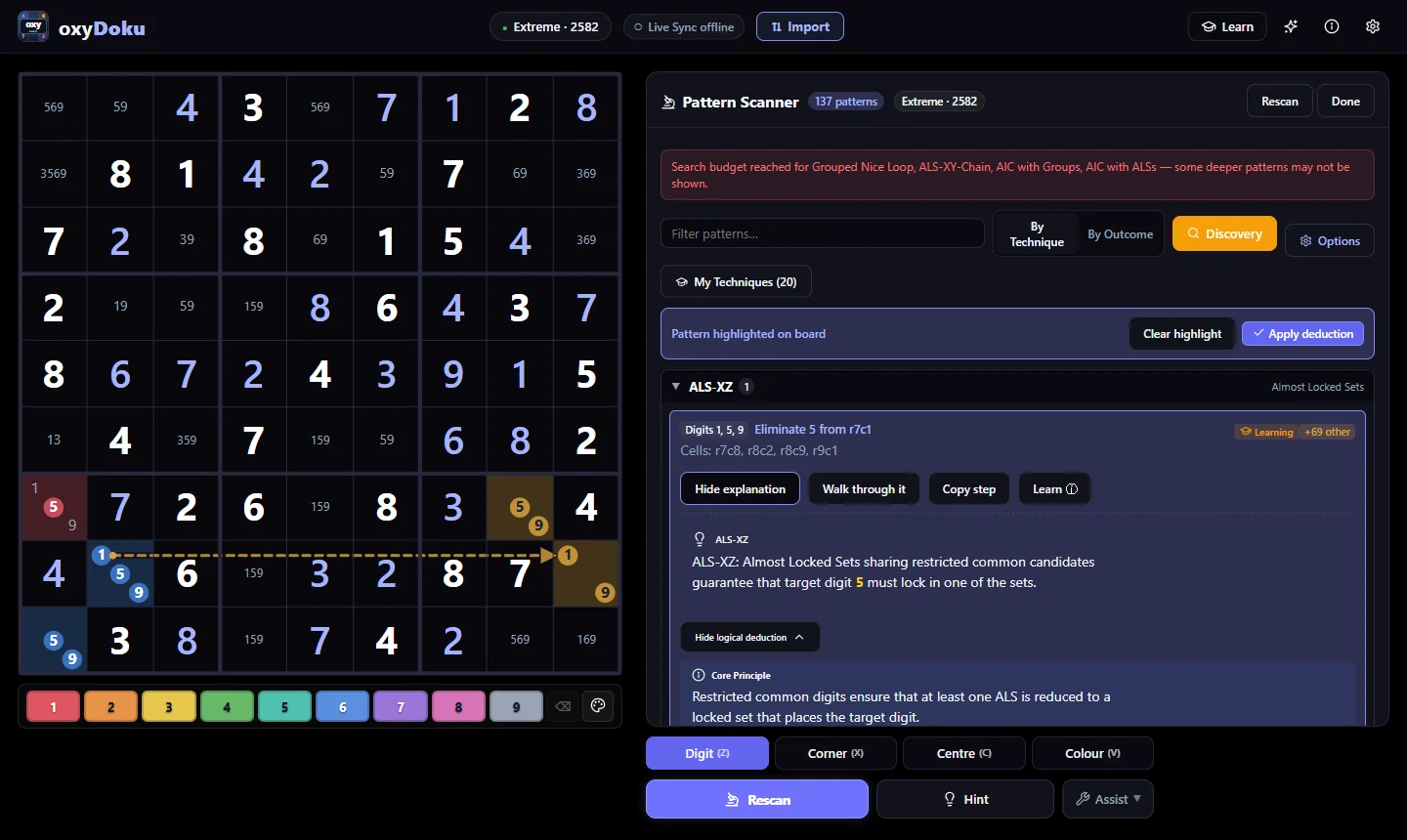
Exhaustive and bounded scanning across 76 human solving techniques surfaces all available deductions at once, pairing board cell highlights with Discovery Mode filtering.
View full-size figureSystem architecture
To keep full-board pattern scans fast in the browser while supporting multiple platforms, oxyDoku separates board representation from pattern search and the interactive learning interface. The core solver engine is written in pure TypeScript and shared across the web application, the Chrome Extension sync bridge, and the Capacitor Android build.
board state → technique finders → outcome grouping → active practice- 01State & import9-bit candidate masks, Sudoku Exchange parser, MV3 sync bridge
- 02Pattern scanner55 exhaustive + 21 bounded finders across 80-technique catalog
- 03Outcome & taxonomyDuplicate removal, outcome grouping, 6 reasoning concepts
- 04Active learningChain trainer, 4-stage progressive hints, answer verification
Exhaustive and bounded multi-pattern scanning
When I got stuck on a difficult puzzle, I didn’t just want to know the easiest available move—I wanted to see every valid pattern sitting on the board at that moment. Out of an 80-technique catalog (79 human techniques plus a brute-force fallback), oxyDoku scans 76 implemented human solving techniques simultaneously (IMPLEMENTED_TECHS). These are divided into 55 exhaustive finders (covering singles, locked candidates, subsets, basic fish, wings, uniqueness, and coloring) and 21 bounded graph finders (X-Chain, XY-Chain, AIC, Grouped Nice Loop, ALS-XZ, ALS-XY-Wing, ALS-XY-Chain, Death Blossom, Sue de Coq, Forcing Chain, and complex fish/Exocet patterns).
Scanning for all 76 techniques at once introduced two practical engineering challenges:
- Keeping deep searches responsive. Advanced chain and Almost Locked Set finders explore branching graph paths that can quickly multiply on open boards. To prevent the browser from hanging, each bounded finder runs within an explicit step budget. If a search reaches its limit before finishing,
searchBudgetReacheddisplays a clear notice in the scanner panel showing which deeper technique families were capped rather than silently omitting results. - Removing duplicate findings. Different search paths can sometimes discover the exact same deduction from different starting cells. oxyDoku identifies and removes duplicate findings—matching each
PatternInstanceby its technique, logical conclusion, and participating cells—so the results remain organized and easier to explore.
Overlapping deductions and reasoning taxonomy
A single candidate elimination can sometimes be explained by several different solving techniques. oxyDoku groups these findings together, allowing me to compare different ways of reaching the same conclusion. By indexing each discovered pattern by the exact elimination or placement it produces (elim:digit:cell or place:digit:cell), the By Outcome view lines up techniques such as an ALS-XZ, an ALS-XY-Wing, and an ALS-XY-Chain whenever they justify the same move. Seeing them side by side makes it much easier to understand how simpler and more advanced patterns connect on the same board.
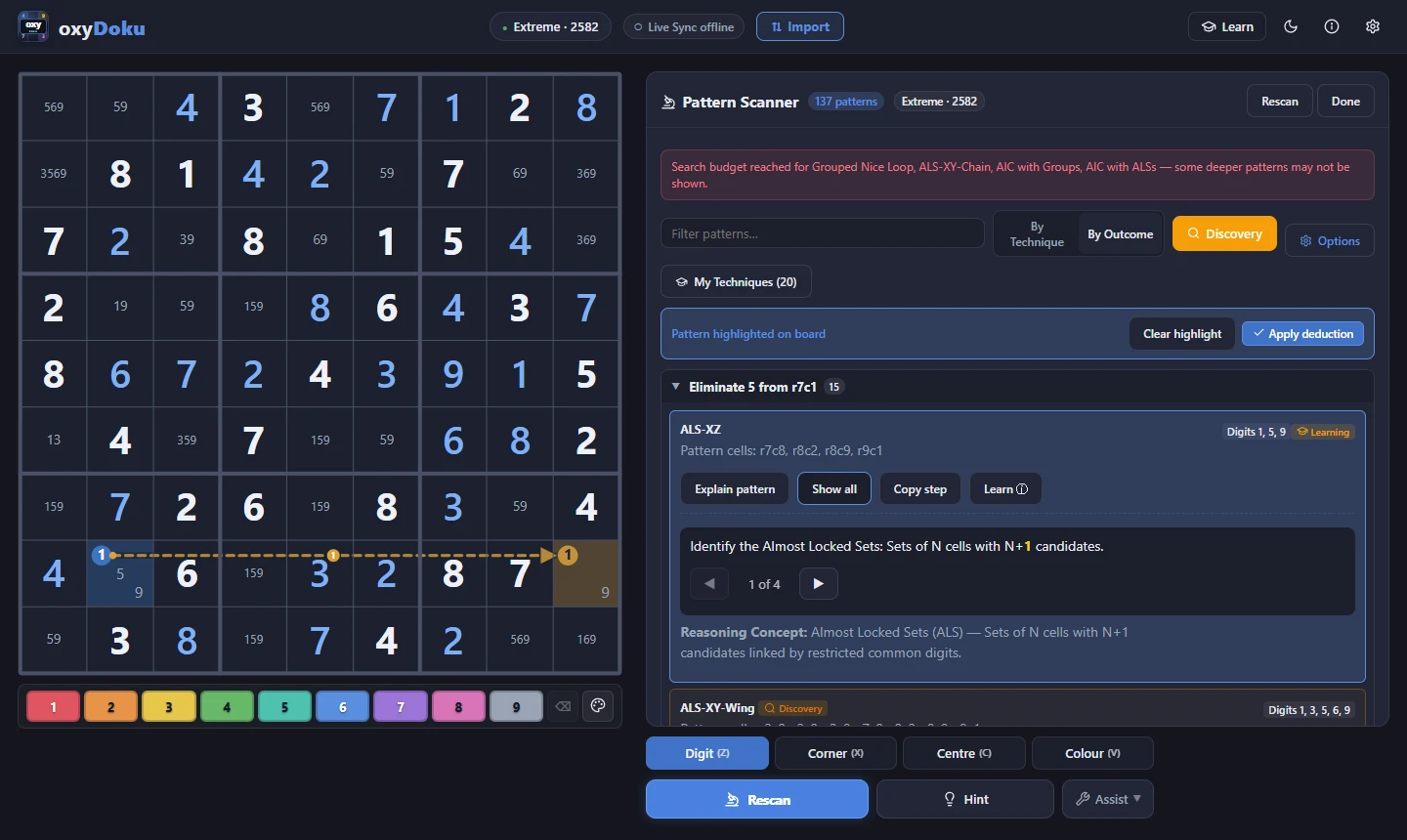
Grouping findings By Outcome lines up different techniques—such as ALS-XZ, ALS-XY-Wing, and ALS-XY-Chain—whenever they prove the same candidate elimination.
View full-size figureStudying 76 separate techniques as a flat list can also feel overwhelming, especially when many of them share the same underlying logic. To make that structure easier to navigate, My Techniques organizes the catalog into six core reasoning concepts: Locked Sets & Subsets, Fish & Single-Digit Patterns, Wings & Bent Subsets, Coloring & Single-Digit Chains, Alternating Inference Chains, and Almost Locked Sets. I can mark individual techniques as Known, Learning, or Unfamiliar to keep everyday scans focused, or switch on Discovery Mode to highlight unfamiliar patterns that appear in a live position.
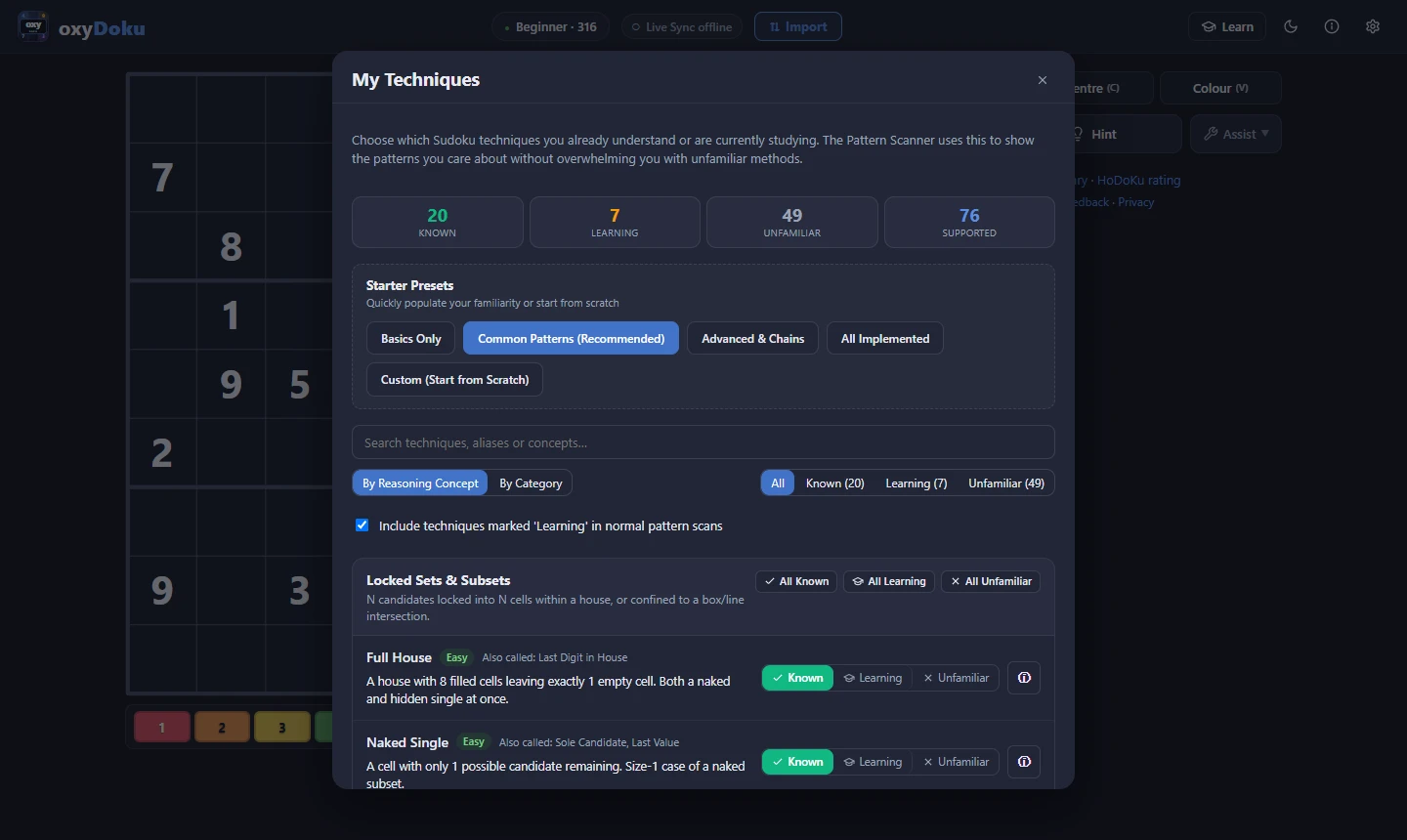
My Techniques organizes all 76 supported patterns into six core reasoning concepts and tracks Known, Learning, and Unfamiliar states.
View full-size figureInteractive proof verification and chain training
Reading a hint explanation makes it easy to nod along without really testing whether I could spot the pattern on my own. To make practice more active, I built two interactive training tools that focus on working through the logic yourself:
- Practice Verifier: Generates targeted exercises from verified puzzle positions where a specific technique applies. As I cross out candidates on the board, select the key digits, and highlight the participating cells, the verifier checks my attempt against all valid deductions in that position (
allValidSteps). It distinguishes between an exact match for the target technique, a valid alternative pattern that proves the same elimination, a partial match, or an incorrect move. When I need a nudge without giving away the answer, a 4-stage progressive hint system reveals the logic gradually—starting with the general area of the board before showing the pattern structure and full explanation. - Chain Trainer: Alternating inference chains were one of the hardest techniques for me to track mentally. The Chain Trainer lets me click candidates directly on the SVG board to draw alternating strong and weak links, check whether the chain forms a valid elimination or continuous loop, and step through the reasoning one link at a time.
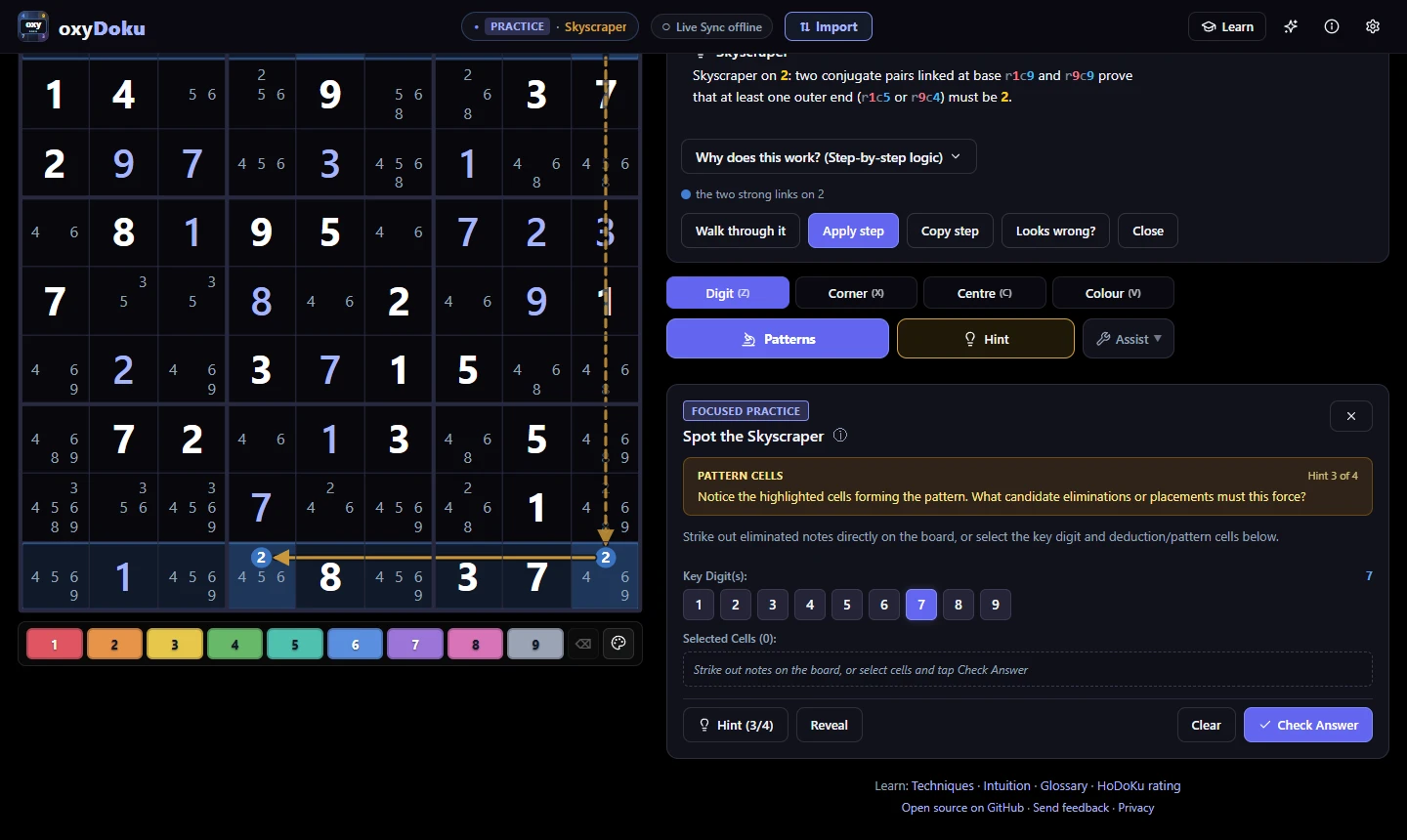
The interactive Practice mode grades eliminations, key digits, and participating cells against every valid deduction on the board while disclosing hints across four progressive stages.
View full-size figure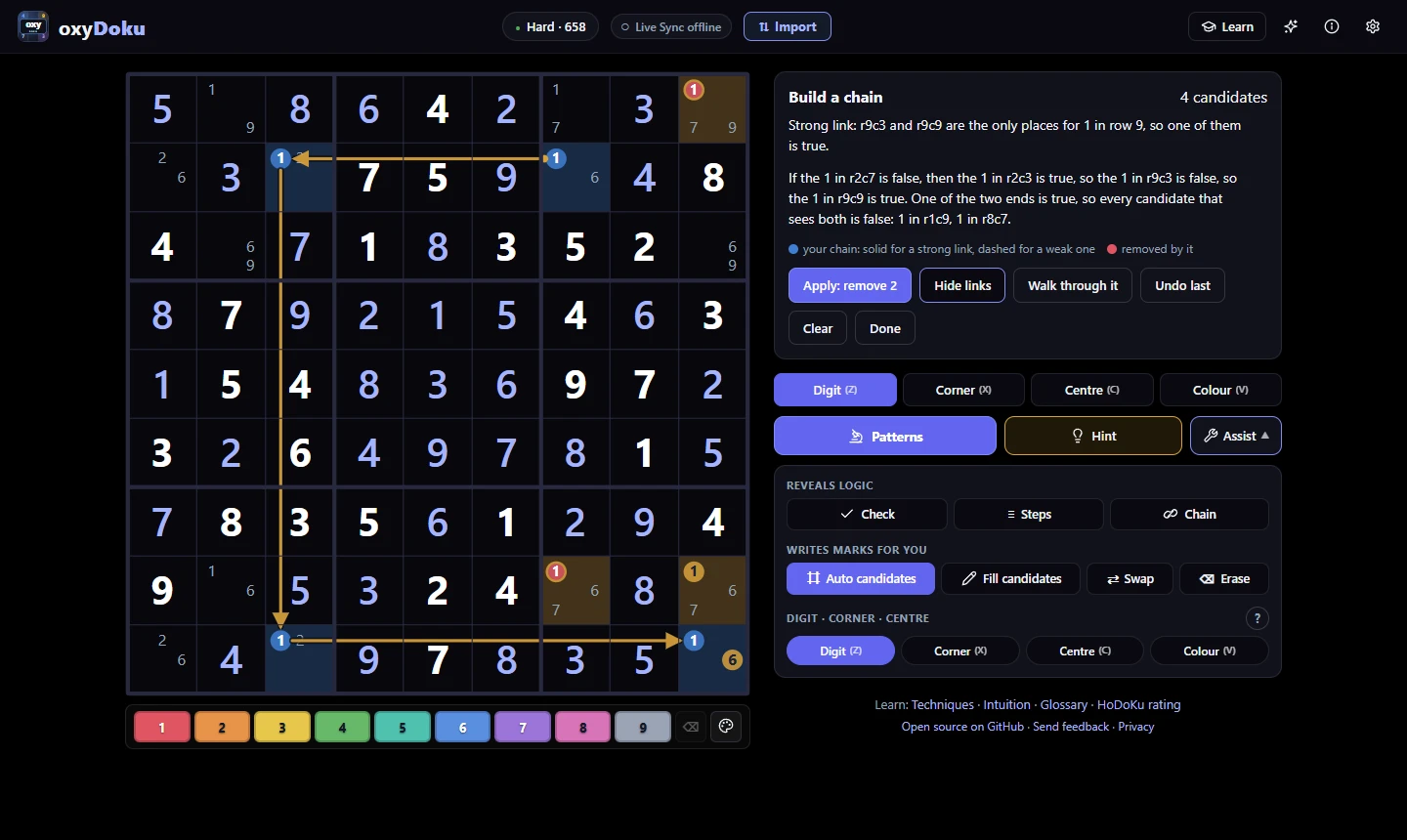
Solvers click candidates directly on the SVG board to construct strong and weak links, test valid eliminations, and toggle step-by-step link visibility.
View full-size figureFull-state import and MV3 Live Sync
When I came across an interesting position while solving on external sites like Sudoku Exchange, copying a standard 81-character puzzle string meant losing all of my progress—every placed digit, corner note, center candidate, and color highlight had to be entered again from scratch. To solve this, I designed a lossless Base64URL v1 state payload (#import-position=) and a dedicated Sudoku Exchange parser that preserves the full board state, including 9-bit candidate bitmasks and cell colors.
To make that workflow effortless while playing, I also built a Manifest V3 Chrome Extension (bridge.js and content.js connected to Zustand via syncStore.ts) that mirrors a live Sudoku Exchange board directly into oxyDoku as candidates are updated, shown below in the custom Chess theme.
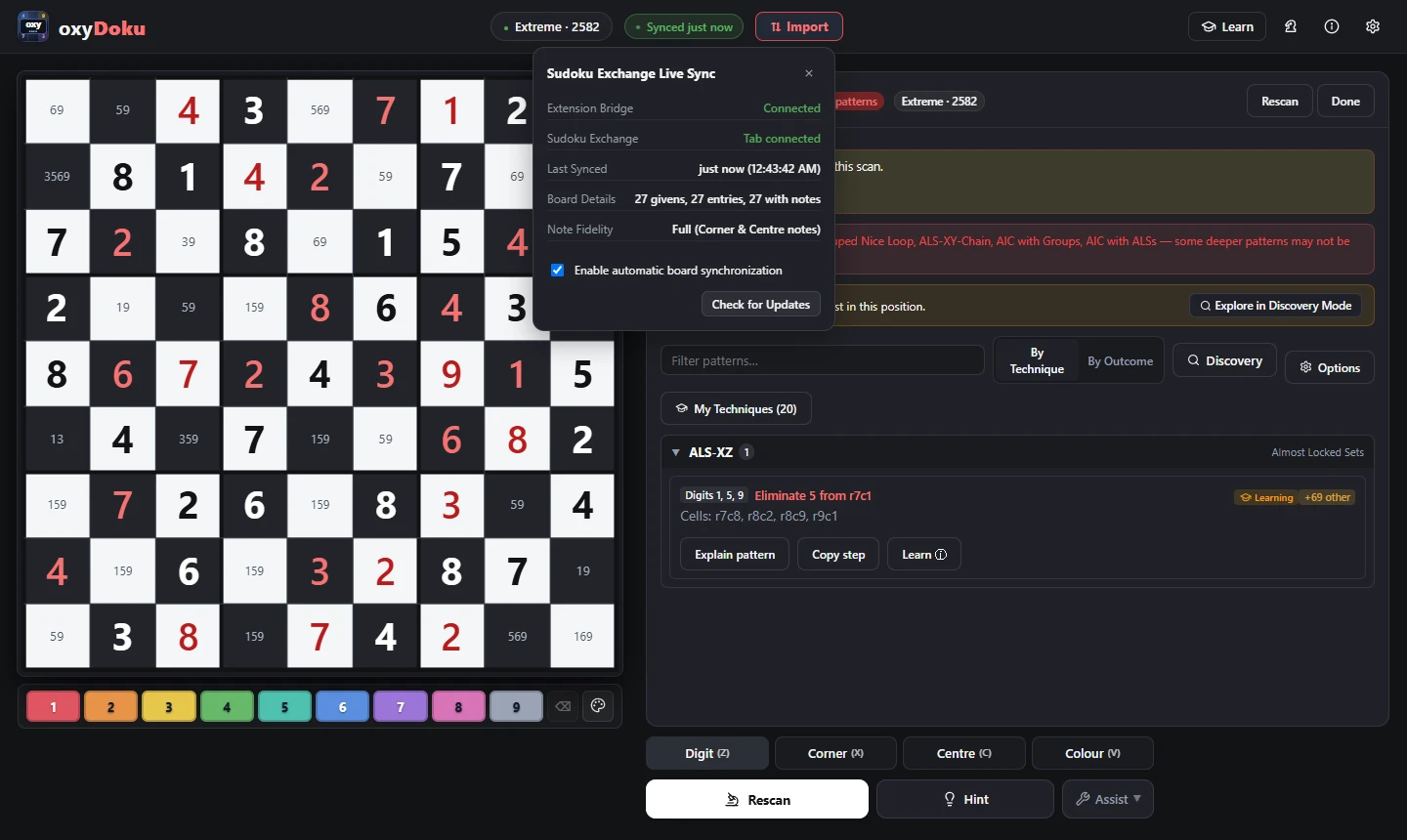
A Manifest V3 Chrome Extension mirrors live board state and pencil-mark bitmasks into oxyDoku, shown here in the custom Chess theme.
View full-size figureVerification and engineering discipline
For a learning tool to be genuinely helpful, its deductions have to be trustworthy—a single false elimination can ruin a puzzle and teach the wrong habit. The solver engine and learning tools are backed by 1,250+ automated Vitest specifications across 82 test files. Rather than relying only on static snapshot checks, scanner.test.ts validates every candidate elimination produced across all 76 implemented techniques against a brute-force unique-solution oracle, ensuring no finder ever eliminates a digit that belongs to the true solution.
Additional test suites verify the 4-stage progressive hint generator (progressiveHints.ts), the answer verification system (practiceVerifier.ts), and lossless pencil-mark round-trips in sudokuExchangeImport.ts. Beyond the interactive web app, the build pipeline generates 267 localized /learn/ guide pages and 80 SVG technique diagrams, and packages the project for offline mobile play through a Capacitor Android wrapper.